Quickstart
This page takes you from installing snoop to following a session live.
Install snoop
The install script picks the build for your machine, checks it against the release’s checksums, and installs it without sudo:
curl -fsSL https://jzills.github.io/snoop/install.sh | shHomebrew, npm, PyPI, Windows and go install are on the install page.
Open the session picker
Run snoop in any terminal.
It lists your Claude Code sessions across all projects, newest first, with each one’s project, branch, title and size.
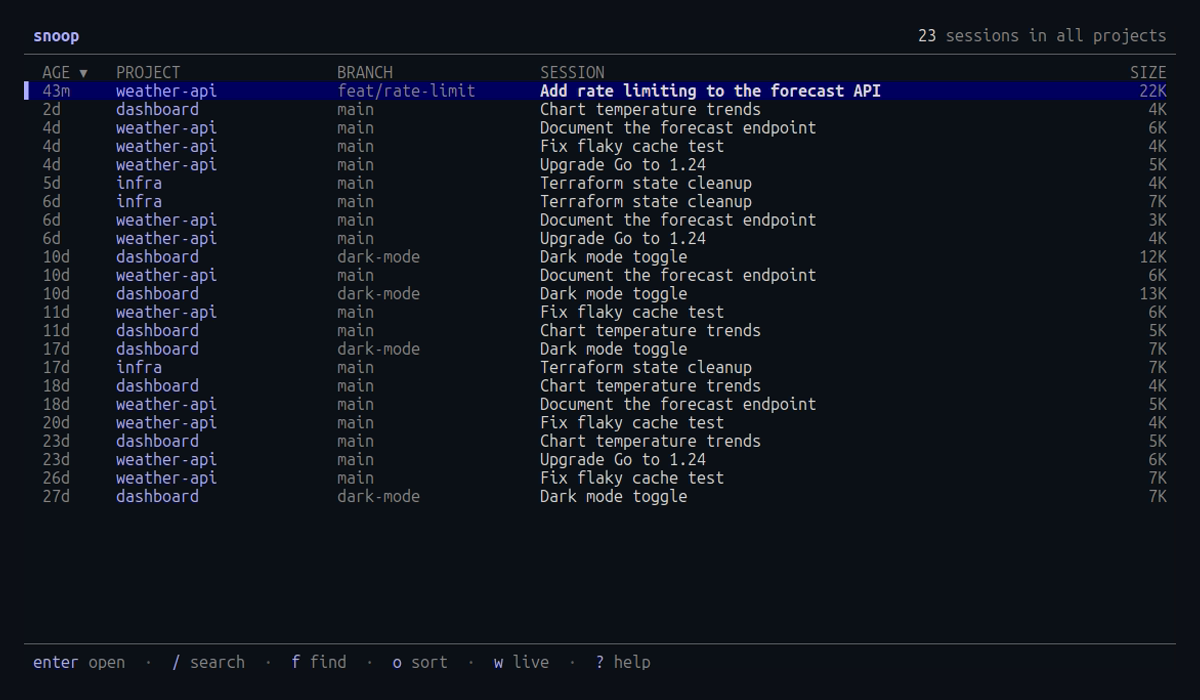
Type / to search titles, projects and branches, or c to show only the sessions for the current directory.
Press o to sort by the next column, and O to reverse the order.
Open a session
Move to a session with ↑ ↓ (or j k) and press enter.
The timeline lists every prompt, reply and tool call.
The right pane shows the selected one in full: the command and output of a Bash call, the diff of an edit, the text of a reply.
The header shows the project, branch and how full the context window is.
Press 1 to 4 to switch between the Timeline, Tools, Stats and Files tabs.
Follow a session live
In a second terminal beside claude, run:
snoop --followThis opens the newest session for the current directory and selects new events as they arrive. When Claude Code starts a new session there, snoop switches to it.
Learn the keys that matter
| Key | Action |
|---|---|
n N | next and previous prompt |
/ | search text, commands, paths and results |
x | expand an Agent call’s subagent inline |
esc | clear the search, then go back |
? | every key for the current screen |
Next
- Following a session explains the timeline in detail.
- The live board shows every running session at once.
- Keyboard shortcuts lists every key.