Review and comment
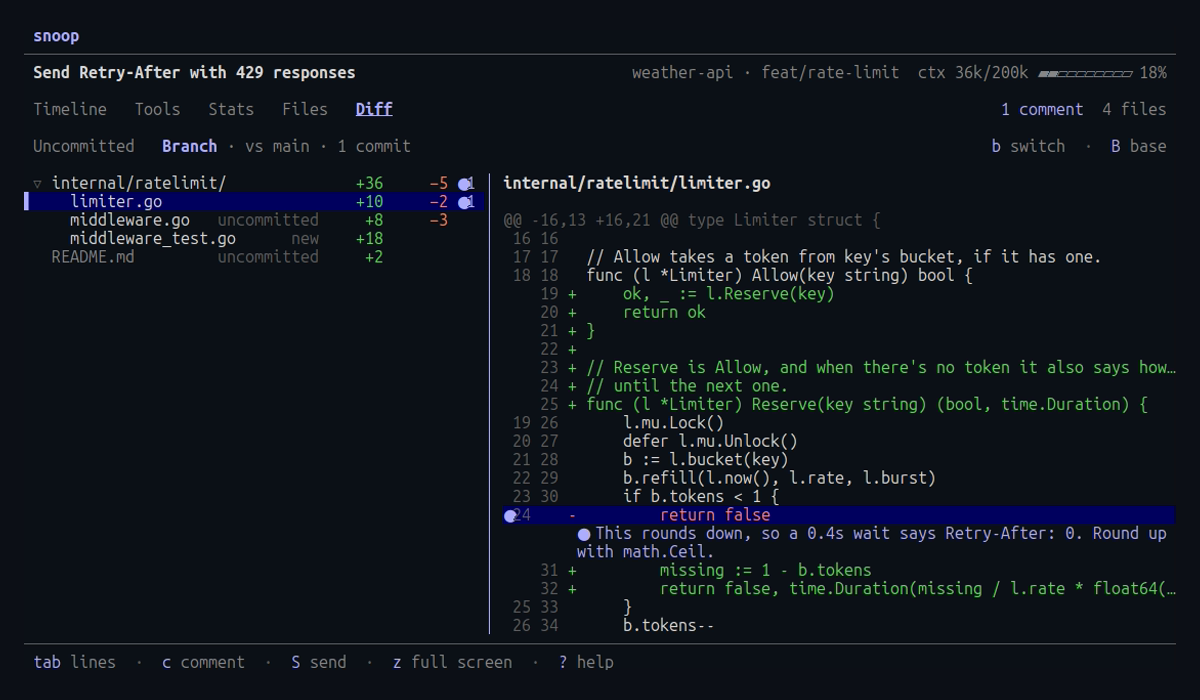
The Diff tab (5) shows what the session changed in its working tree, and lets you comment on it.
The agent receives the comments on its own, without you typing into its terminal.
Set up the hooks once
Comments reach the agent through Claude Code hooks. Run this once:
snoop hooks installIt adds four entries to ~/.claude/settings.json, keeping everything else in the file.
Three deliver comments, and the fourth lets the live board answer permission prompts.
With --project, it uses .claude/settings.json in the current directory instead.
Run snoop hooks status to check them, and snoop hooks uninstall to remove them.
A session that was already running may need a restart before it uses the hooks.
Uncommitted or the whole branch
The line at the top of the tab shows two scopes, and b switches between them:
- Uncommitted lists every file in
git diff HEAD, plus untracked files, shown as added. - Branch lists everything the branch changed since it left its base, committed or not.
It’s what a pull request would show, plus the work in progress, so you can review an agent’s whole branch without opening a PR.
Files with changes since the last commit are tagged
uncommitted.
The tab opens in Branch when the branch has commits of its own, and in Uncommitted otherwise. Your choice holds for every session until you quit.
Unless you choose a base, snoop compares with the closest of develop, main, master and trunk, meaning the one your branch has the fewest commits since.
It prefers origin/develop to a local develop, since a local copy may be out of date, and on a tie it prefers develop.
The line at the top names the base and counts the branch’s commits.
To compare with another branch, press B, which lists the usual bases and recently changed branches with the commits since each.
Press enter to choose one.
It’s saved for the current branch with git config branch.<name>.snoopBase, so the next time you open the tab it compares with the same base.
To set a base for a whole repository, run git config snoop.base develop.
Comments work the same in both scopes. Each diff ends at the files on disk, so line numbers match what the agent sees.
Read the diff
Files this session or its subagents changed come first.
Files changed by you or another agent are dimmed, and the right pane says so.
The files are shown in a tree of folders, which works as in the Files tab: selecting a folder lists its files and their totals, and T switches to a flat list.
Press z to show the diff on the whole screen, where comments work as before, and press it again to bring back the files.
Press enter or tab to move into a file’s lines, and J and K to jump between hunks.
The diff is read when you open the tab, again when the session finishes an edit or a command (at most every two seconds), which includes the agent’s commits, and when you press r.
Git runs in the background, so following the session doesn’t slow down.
Comment
Press c on a line to comment on it.
To comment on several lines, press v, move to the last line, and press c.
Press C to comment on the whole file.
A ● marks commented lines, the comment’s text shows under its last line, and the file list counts each file’s comments.
Press e on a commented line to edit its comment, or x to delete it.
You can also comment on one of the session’s changes from the Files tab, and S sends those too.
Send
Press S to send every comment at once.
The agent sees them at the first of three moments:
- While it’s working, it sees them after its current tool call.
- When it tries to finish its turn, it gets them and keeps going.
- Otherwise, they arrive with your next prompt.
The footer shows sent 2 comments, waiting for the agent until a hook takes them, then delivered 2 comments.
If the session isn’t running, the comments wait until you resume it.
Each comment names the file and lines and quotes the code, like this:
Review comments from snoop:

internal/store/store.go:40-42
    40 +	if err != nil {
    41 +		return nil
    42 +	}
Don't swallow the error; return it.
Without the hooks, S copies the comments to the clipboard instead and keeps them, so you can paste them into the session or install the hooks and send them again.
Leaving a session or quitting with unsent comments asks first.
With --follow, a new session opens only once your comments are sent or discarded.