The live board
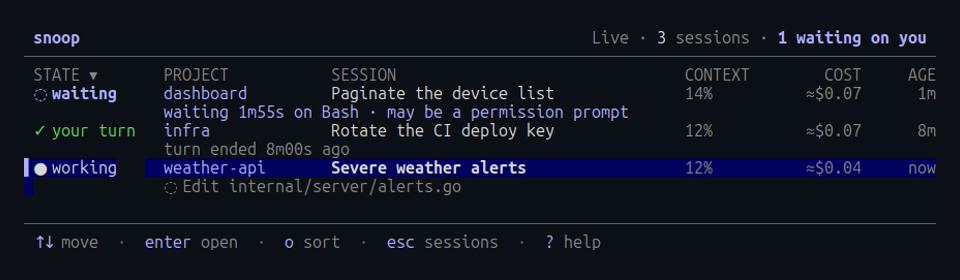
The live board lists every session written in the last 30 minutes, across projects, most urgent first. Use it when you run several sessions at once and want to know which one needs you.
snoop --liveYou can also press w in the session picker.
States
| State | Meaning |
|---|---|
? asking | the session asks for permission to use a tool, which you can answer here |
◌ waiting | a tool call has had no result for 30 seconds, usually a permission prompt |
✓ your turn | the turn ended, or you interrupted it |
● working | replying, or running a tool or subagent |
· idle | no prompts yet, or nothing written for 10 minutes |
The header counts the sessions waiting on you. Each row shows the project, the session, how full its context is, its cost, and when it last wrote. Sessions leave the board after 30 minutes without writes.
Press enter to open a session and esc to come back to the board.
From the board, esc or w returns to the session picker.
To sort by another column, press o, which moves to the next column, and O to reverse the order.
The sorted column’s heading is marked ▾, or ▴ when reversed.
The waiting threshold is --stall, 30 seconds by default.
Permission prompts aren’t recorded in the transcript until you answer them, so a tool call with no result is the closest sign of one.
Answer permission prompts
When a session asks for permission to use a tool, its row shows ? asking and what it wants, such as Bash: npm test.
Selecting the row shows the request in full under the list: the command and its description, the edit’s diff, or the tool’s input, with the folder it runs in.
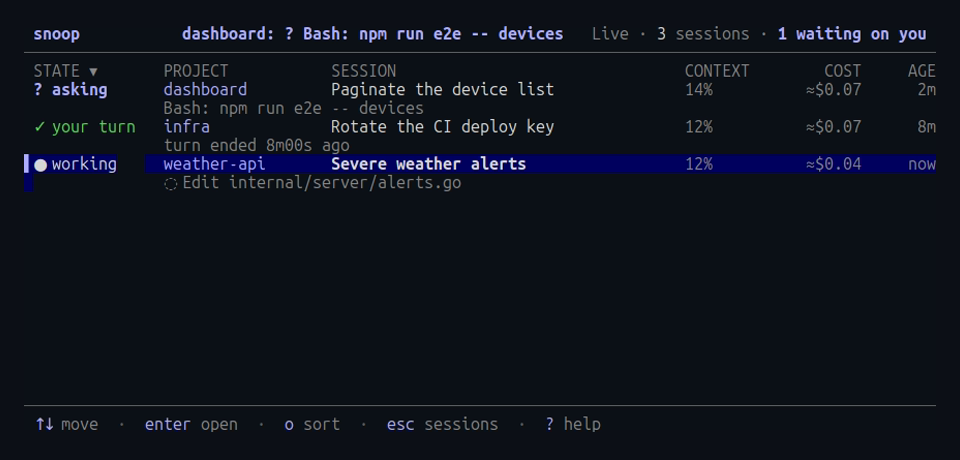
Press A to allow it once, or D to deny it.
After D, you can type a reason, which Claude sees, and press enter, or press esc to cancel.
Press Y to allow it and stop Claude Code asking again.
That makes the same change as the “don’t ask again” choice in Claude Code’s own prompt, which the board shows under the request: usually a rule such as Bash(npm test) in the project’s local settings, and for some requests a session-wide change, such as accepting all edits.
When Claude Code offers no such change, Y does nothing.
The same keys work in the session’s own view, whose footer shows the request.
When a session has several requests, such as from parallel subagents, the keys answer the oldest.
This needs snoop’s hooks, which you add once:
snoop hooks installClaude Code’s own prompt still appears in the session’s terminal, and whichever answer comes first wins.
The hook waits for snoop only while a live board or session view is open, for at most 5 minutes; to change that, pass --ask-wait, such as snoop hooks install --ask-wait 10m.
With no snoop open, the hook returns at once.
Reply when it’s your turn
When a session’s turn ends, its row shows your turn.
Press R to type a reply and enter to send it, or esc to cancel, and the agent carries on as if you’d typed it in its terminal.
The same key works in the session’s own view, whose footer shows the agent’s last message.
In the Timeline and Tools tabs, the reply is about the selected call or message.
It quotes that first, such as About the Bash call at 14:03:12 (npm test), which failed: with the first lines of the result, and then your text.
With snoop’s hooks installed, a finished turn waits for a reply while a live board or session view is open, for as long as a permission request waits.
Typing in the session’s terminal ends the wait at once, so the terminal never waits for snoop, and a run with no terminal, such as claude -p, doesn’t wait at all.
A reply sent while the agent is working reaches it after its current tool call, and one sent with no turn waiting reaches it with your next prompt in its terminal.
If you installed the hooks before replies existed, run snoop hooks install again.
Notifications
Add --notify to get a desktop notification when a session needs you:
snoop --live --notifyEach notification names the session and what happened:
api · Fix the flaky test
Your turn · finished after 2m10s
By default snoop notifies when a turn ends, when a tool call fails, and when a session asks for permission (Bash wants to run npm test).
Choose others with --alerts, for example --alerts turn,stall,error to include sessions waiting on a tool call.
To catch a runaway session, set a cost or time limit.
With --cost-alert 5, snoop alerts each time a session spends another $5, and with --long-turn 15m, it alerts when a turn has run for 15 minutes:
snoop --live --notify --cost-alert 5 --long-turn 15mNothing is sent while snoop’s window has focus. At most one notification goes out per session and alert a minute, and several snoops watching the same session send one between them.
Alerts and notifications lists every alert and how notifications are delivered on each platform.
Cost of watching
Only sessions on the board are read, and after the first read only what they add. An idle board checks each file’s size once a second.