Files and diffs
The Files tab (4) lists every file the session and its subagents read, edited or wrote.
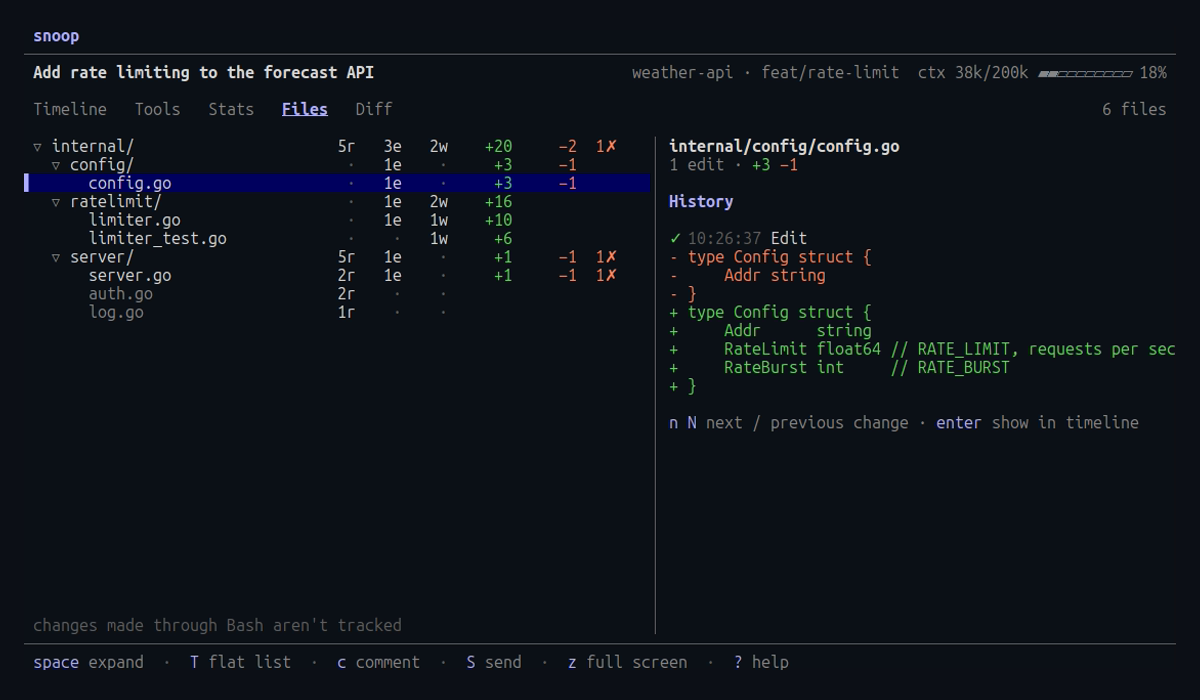
The list
Each file shows its read, edit and write counts and the lines added and removed.
Changed files come first, then files only read, each most recent first.
Press / to keep only files whose path matches.
The tree
The files are shown in a tree of folders.
Press T to show them as a flat list, and press it again to go back to the tree.
The choice carries over to the next session you open.
Each folder shows the totals of the files under it, and a folder that holds only one folder shares its row, as in internal/ui/.
Every folder starts open.
In the tree, press space or enter on a folder to open or close it, or use ← and →.
Pressing ← on a file moves to its folder.
Press E on a folder to open it and every folder inside it, and press it again to close them.
On a file, E does the same for every folder in the tree.
While you search, every folder with a match is open.
Selecting a folder lists its files in the right pane.
Press z to show the right pane on the whole screen, and press it again to bring back the list.
The footer stays, and the keys work as before: ↑ and ↓ change the file, and c and C comment on it.
A file’s history
The right pane shows the selected file’s history, with every change as a diff.
Press n and N to step through the changes, or enter to show the file’s latest change in the timeline; for a change a subagent made, that is the Agent call.
Pressing y copies all of the file’s changes to the clipboard.
Comment on a change
Press c to comment on the change at the top of the right pane, the one n and N move to, or C to comment on the whole file.
The comment quotes the change and names it, such as the Edit at 14:03:12, rather than giving line numbers, which may have moved since.
Press c on the same change again to edit its comment.
The file list counts each file’s comments, and S sends them along with any from the Diff tab, as described in Review and comment.
sed -i or a code generator, aren’t tracked.
Only the Read, Edit, MultiEdit, Write and NotebookEdit tools are.